MIDI 2.0受信プログラム
Mac + C++ + Core MIDIでMIDI 2.0 UMPを受信するプログラムです。 Macに接続されたMIDI 2.0機器からUMP(Universal MIDI Packet)を受信し、 受信したデータを16進数で表示します。
MIDI 2.0機器から送信されたMIDI 2.0のメッセージは、macOSのCore MIDIフレームワークを通してアプリケーションに渡されます。
アプリケーションは、Core MIDIからMIDIEventListという構造体を受け取ります。
MIDIEventListには、1つ以上のMIDIEventPacketが含まれています。
MIDIEventPacketには、イベントのタイムスタンプと、UMP(Universal MIDI
Packet)のデータが格納されています。
UMPのデータはwords[]から取り出すことができます。
1つのMIDIEventPacketに複数のUMPが含まれる場合があります。
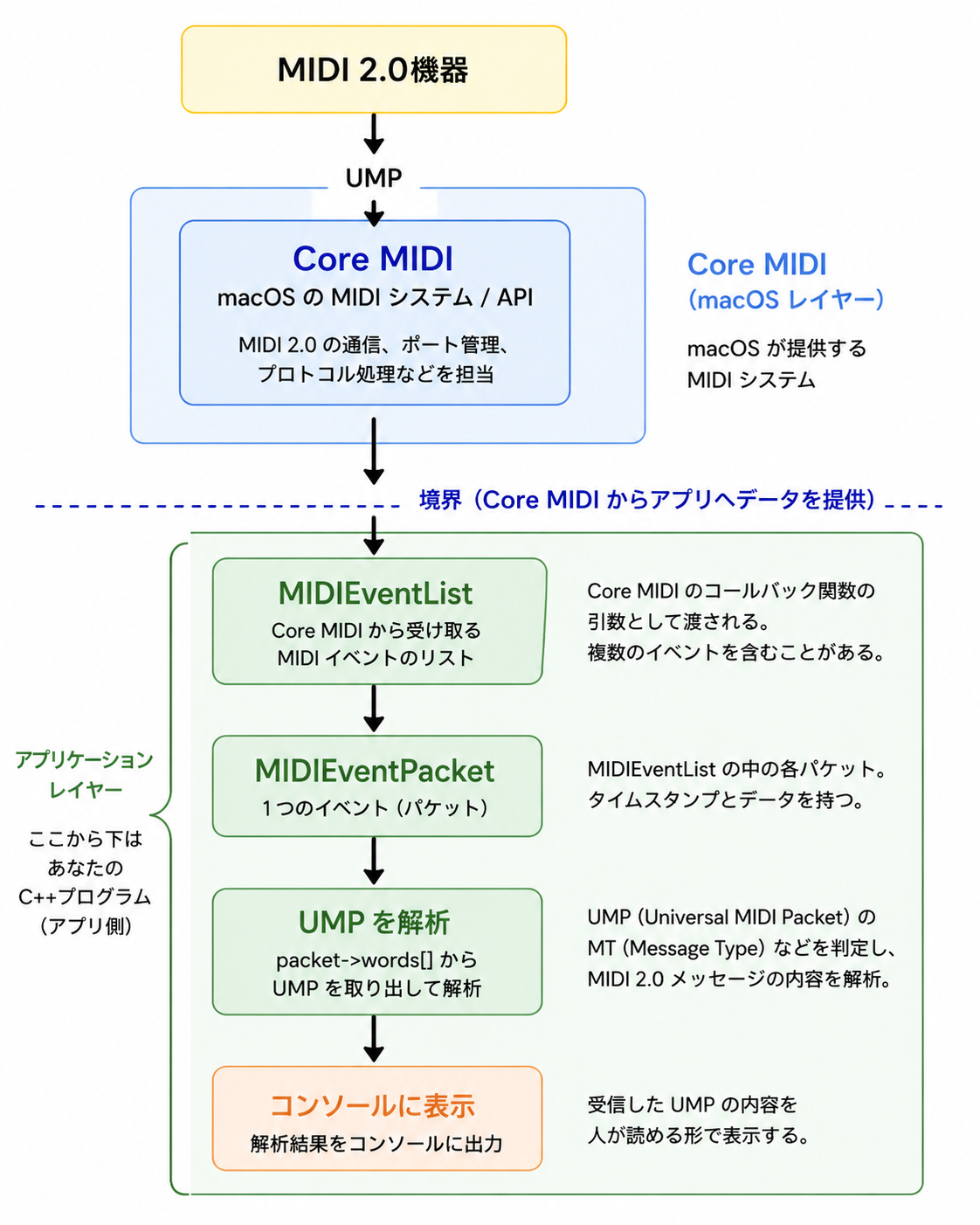
アプリケーションでは、words[]からUMPを取り出し、Message Type(MT)などを調べて、MIDI 2.0メッセージの内容を解析します。 このプログラムでは、MT4のメッセージをそのままバイナリでコンソールに表示しています。
#include <iostream>
#include <iomanip>
#include <CoreMIDI/CoreMIDI.h>

// MIDI 2.0受信コールバック
static void processMIDIEvent(const MIDIEventList *eventList)
{
    if (eventList == nullptr) return;

    const MIDIEventPacket *packet = &eventList->packet[0];
    // eventListの中のパケットの数だけ処理する
    for (UInt32 i = 0; i < eventList->numPackets; ++i)
    {
        // パケットの中のワードの数だけ処理する
        for (UInt32 w = 0; w < packet->wordCount; ++w)
        {
            uint32_t word = packet->words[w];

            std::cout
                << "0x"
                << std::hex
                << std::setw(8)
                << std::setfill('0')
                << word
                << " ";
        }
        std::cout
            << std::dec
            << std::endl;

        packet = MIDIEventPacketNext(packet);
    }
}

int main()
{
    MIDIClientRef client = 0;
    MIDIPortRef inputPort = 0;

    OSStatus status;

    // MIDI Clientを作成
    status = MIDIClientCreateWithBlock(
        CFSTR("UMP Receiver"),
        &client,
        nullptr);

    if (status != noErr)
    {
        std::cerr
            << "MIDIClientCreateWithBlock failed: "
            << status << std::endl;
        return 1;
    }

    // MIDI 2.0用Input Port
    status = MIDIInputPortCreateWithProtocol(
        client,
        CFSTR("UMP Input"),
        kMIDIProtocol_2_0,
        &inputPort,
        ^(const MIDIEventList *eventList,
          void *srcConnRefCon) {
          processMIDIEvent(eventList);
        });

    if (status != noErr)
    {
        std::cerr
            << "MIDIInputPortCreateWithProtocol failed: "
            << status << std::endl;
        return 1;
    }

    // MIDI Portの名前を列記する
    ItemCount sourceCount = MIDIGetNumberOfSources();

    std::cout
        << "MIDI Sources: "
        << sourceCount
        << std::endl;

    for (ItemCount i = 0; i < sourceCount; ++i)
    {

        MIDIEndpointRef source = MIDIGetSource(i);
        CFStringRef name = nullptr;

        MIDIObjectGetStringProperty(
            source,
            kMIDIPropertyName,
            &name);

        char nameBuffer[256] = {};

        if (name != nullptr)
        {
            CFStringGetCString(
                name,
                nameBuffer,
                sizeof(nameBuffer),
                kCFStringEncodingUTF8);

            CFRelease(name);
        }

        std::cout
            << "[" << i << "] "
            << nameBuffer
            << std::endl;
    }

    // Source番号を入力
    int isourcenum;

    std::cout << "Select MIDI Source: ";
    std::cin >> isourcenum;
    {

        // isourcenum番目のMIDI Sourceに接続
        MIDIEndpointRef source = MIDIGetSource(isourcenum);

        status = MIDIPortConnectSource(
            inputPort,
            source,
            nullptr);

        if (status != noErr)
        {
            std::cerr
                << "MIDIPortConnectSource failed: "
                << status << std::endl;
            return 0;
        }
    }

    std::cout << std::endl;
    std::cout << "Waiting for MIDI 2.0 UMP..." << std::endl;
    std::cout << "Press Ctrl+C to exit." << std::endl;

    // プロセスを終了させない
    while (true)
    {
        CFRunLoopRunInMode(
            kCFRunLoopDefaultMode,
            1.0,
            false);
    }

    return 0;
}
実行すると以下のように表示します。MIDI2.0のデバイスは「MIDI 2.0デバイスを試作」で作ったRaspberry Pi Zero 2Wです。
> ./rcvmidi2
MIDI Sources: 5
[0] Bus1
[1] Bus2
[2] NetworkMIDI2
[3] Monosynth
[4] MIDI 2.0
Select MIDI Source: 4

Waiting for MIDI 2.0 UMP...
Press Ctrl+C to exit.
0x40902711 0xc0752345
0x40802711 0x20752345
0x40902811 0xc07a2345
0x40802811 0x207a2345
0x40902911 0xc0802345
0x40802911 0x20802345
0x40902a11 0xc0852345
0x40802a11 0x20852345
0x40902b11 0xc08a2345
0x40802b11 0x208a2345
0x40902c11 0xc08f2345
0x40802c11 0x208f2345
0x40902d11 0xc0942345
0x40802d11 0x20942345
0x40902e11 0xc0992345